
WordPress is the world’s most popular website and content management system (CMS). It is used by millions of people and businesses to create websites and blogs, store files, manage data, share information, and much more. WordPress has become the go-to choice for those looking to create a website because of its flexibility, power, and ease […]
Category: v2
How to Create a WordPress Gallery – Step-by-Step Guide

Whether you are displaying your portfolio or showcasing products, having an attractive and professional looking image gallery on your website is essential for attracting customers and increasing engagement on your site. Fortunately, creating such a gallery is now easier than ever with the use of plugins for the popular CMS platform, WordPress. In this article […]
Why is WordPress so popular

WordPress is popular for many reasons, from its ease of use to its ability to manage content. It’s popular not just among casual users but also professionals, such as bloggers and web designers, who appreciate its versatility and power. With WordPress you can easily create complex websites and customize them with plugins and themes without […]
10 tips for safely using your credit card online

Some people are afraid to use credit cards because the interest on them is many times higher than on other consumer loans. For others, the credit card is an essential part of life. They can use it every day, earning bonuses. So, let’s discuss 10 tips for safely using your credit card online! Credit Cards […]
Moving Your WordPress Blog to a New Host
Any site is in fact a set of files (texts, images, videos, software scripts, database, etc.). But why do you need hosting for the site? So that Internet users can see it at all. It is not enough to have files of the site on your PC, they need to be put on the network. […]
Building collapsible plugin

$ WP_Widget_Archives = new WP_Widget_Archives ();// use class methods Methods __construct ()Installs an instance of the widget.form ($ instance)Displays a form with the input of the widget settings (in the admin panel).update ($ new_instance, $ old_instance)Controls updating of the widget settings.widget ($ args, $ instance)Displays the content of the widget (in the front of the […]
Configure SMTP AUTH for mail servers
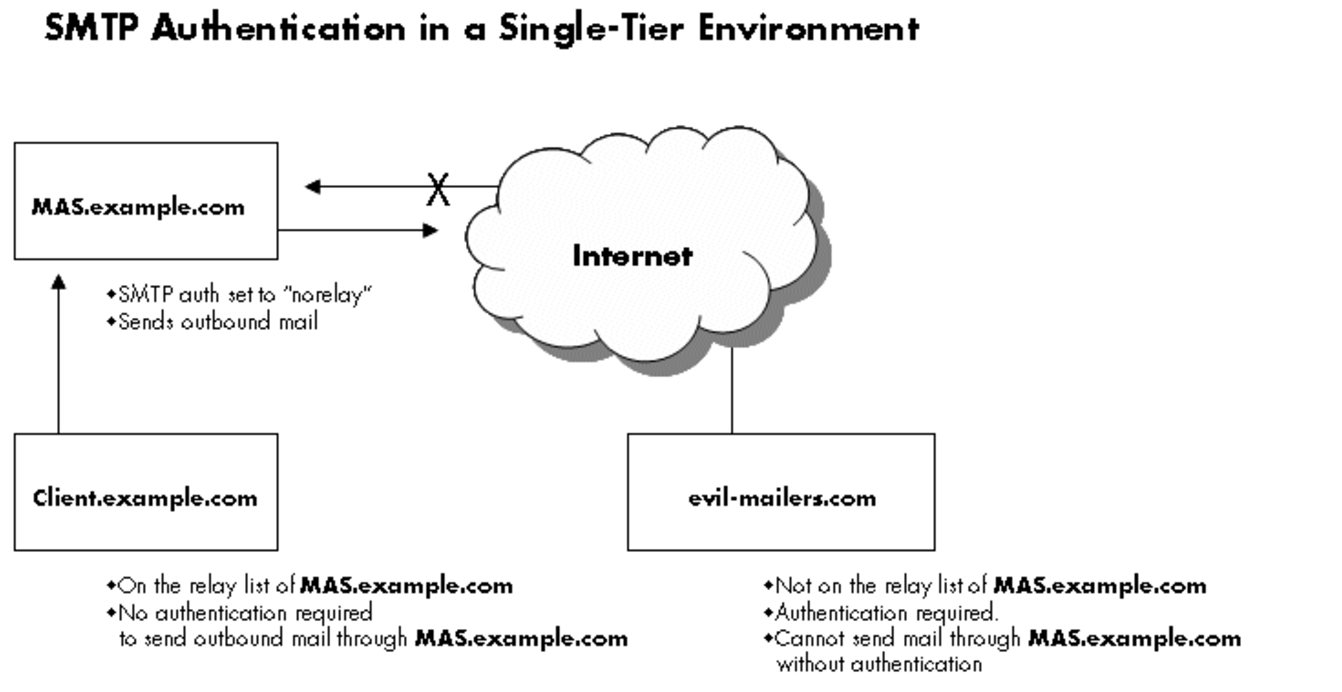
Create a text file as follows:# P=/etc/postfix/password# vi $PThe format of the client password file is as follows: #smtp.isp.com username:password smtp.vsnl.in vivek@vsnl.in:mySecretePassword Save and close the file. Set permissions:# chown root:root $P# chmod 0600 $P# postmap hash:$P Enable SMTP AUTH Open main.cf file, enter:# vi /etc/postfix/main.cfAppend following config directives: relayhost = smtp.vsnl.in smtp_sasl_auth_enable = yes […]
TasteWP – a convenient service for testing WordPress sites

The TasteWP platform is a sandbox for sites running on one of the most popular engines today – WordPress. Using this service, you can install your project for revision or testing in just a few minutes. This is very convenient not only for users, but also for plugin developers who can check how their code […]
ePayCore – payment service for freelance developers and more

Everyone who works on the Internet has come across payment systems in one way or another: to buy goods, earn money, make transfers to relatives, etc. The network has several suitable services in this area: WebMoney, Yandex.Money, Payeer, QIWI, PayPal, etc. Today I want to consider a new international system ePayCore, which has the functions […]
Coding random posts widget

You can add the code below to your theme’s functions.php file between the PHP tags. The PHP tags look like this: <?php…..?> function wpdean_rand_posts() { $args = array( ‘post_type’ => ‘post’, ‘orderby’=> ‘rand’, ‘posts_per_page’ => 5, ); $the_query = new WP_Query( $args ); if ( $the_query->have_posts() ) { $string .= ‘<ul>’; while […]